
GitHub Trending Repositories Weekly Radar – 2025-12-01
By zjy365 on 2025-12-01
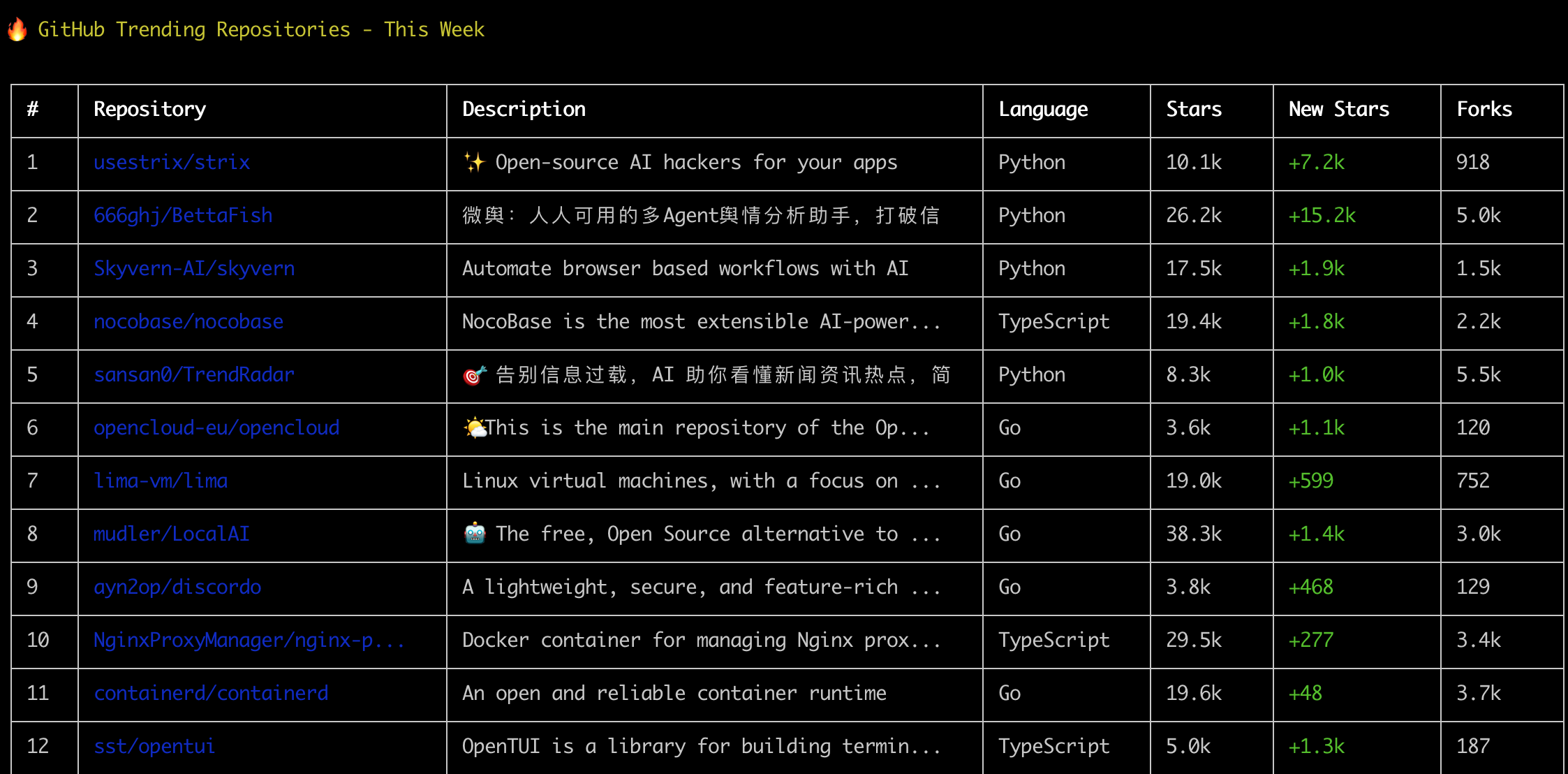
GitHub Trending Repositories Weekly Radar – 2025-12-01
Why this week’s GitHub Trending Repositories matter
Developers are navigating a rapidly changing stack: AI agents encroach on workflows, DevOps is increasingly self‑hosted, and teams need faster paths from idea to production. This week’s GitHub Trending Repositories (2025-12-01) reflect those pressures with a compelling mix of security automation, multi-agent analysis, no‑code platforms, cloud runtimes, and terminal-first productivity. The value for you:
- Cut research time: we summarize what each project does, who it’s for, and how to get started.
- Compare options: a side-by-side table highlights language, stars, learning curve, and pros/cons.
- Make decisions faster: clear use cases and best practices map projects to real‑world scenarios.
If you want more curated tools by category, explore our collections on DevKit.best:
- AI & Agents: https://devkit.best/category/ai/
- DevOps & Infrastructure: https://devkit.best/category/devops/
- Open Source Picks & How‑Tos: https://devkit.best/category/open-source/
Weekly trends at a glance
This week’s Weekly Trending themes:
-
AI agents and automation
- strix: offensive security agents for pen‑testing
- BettaFish & TrendRadar: multi‑agent intelligence and news trend analysis
- skyvern: AI browser automation
- ktransformers & cognee: inference optimization and agent memory
- LocalAI: local‑first, self‑hosted LLMs with broad modality support
-
Developer platforms and tooling
- nocobase: extensible no‑code/low‑code with AI features
- lima & containerd: container and VM foundations
- nginx-proxy-manager & alertmanager: ops essentials
- opencloud: Go backend for a cloud server platform
- dbeaver: universal database client
- opentui & discordo: terminal-first UX
The throughline: pragmatism. Whether it’s turning AI into reliable automation or simplifying infra, this cohort leans toward developer ergonomics and production readiness.
Repository deep‑dives
Below are concise, developer‑focused analyses for each project trending this week. Each section covers feature overviews, use cases, technical highlights, and a safe quick start path.
1) strix (Python) — AI agents for penetration testing
- Feature Overview: Open‑source AI agents designed to automate phases of penetration testing and security assessments.
- Core Features:
- Agentic workflows for recon and exploitation
- Modular tasks and tool integrations
- Repeatable runs for consistent assessments
- Python ecosystem and scriptability
- Use Cases:
- Security engineers automating recon/exploitation
- Red teams building repeatable attack simulations
- DevSecOps pre‑prod scanning pipelines
- Technical Highlights:
- Python-first, extensible agent behavior
- Composable tasks for different phases of pen‑testing
- Quick Start Guide:
- Review the README and security disclaimers
- Clone repository and create a virtual environment
- Configure required API keys/tools per docs
- Run sample agent workflow on a test environment
External reference (GitHub): https://github.com/usestrix/strix
2) BettaFish (Python) — Multi-agent public opinion analysis
- Feature Overview: A multi‑agent舆情 (public opinion) analyzer that aggregates sources, analyzes sentiment and trends, and assists forecasting/decision‑making.
- Core Features:
- Source aggregation and deduplication
- Multi‑agent insights and prediction hints
- From‑scratch implementation (no framework dependency)
- Use Cases:
- Analysts monitoring topic evolution
- Teams seeking early trend signals
- Researchers studying sentiment/emergent topics
- Technical Highlights:
- Python agents orchestrated for media analysis
- Emphasis on transparency and framework independence
- Quick Start Guide:
- Check prerequisites in README
- Clone repo and configure environment variables
- Test a baseline pipeline on a small dataset
- Iterate data sources and prompt templates
3) skyvern (Python) — AI browser workflow automation
- Feature Overview: Automates browser-based workflows using AI to interact with web pages.
- Core Features:
- Headless browser control
- DOM-aware AI task execution
- Workflow definition and retries
- Use Cases:
- RPA‑like automation for internal tools
- Data entry, scraping within terms of service
- Integration testing of web flows
- Technical Highlights:
- Python stack with browser drivers
- Agentic error handling, step retries
- Quick Start Guide:
- Install dependencies and browser drivers per docs
- Clone repository, set environment variables
- Run a demo workflow and customize selectors
4) nocobase (TypeScript) — Extensible AI‑powered no‑code/low‑code
- Feature Overview: A highly extensible, AI‑assisted platform for building business apps and enterprise solutions without traditional coding.
- Core Features:
- Plugin architecture and schema‑driven modeling
- UI builders and data connectors
- AI assistance for building and automation
- Use Cases:
- Internal tools and CRUD apps
- Rapid prototypes, MVPs, small enterprise apps
- Citizen developer enablement
- Technical Highlights:
- TypeScript monorepo, modular plugins
- Extensibility via APIs and add‑ons
- Quick Start Guide:
- Follow the installation guide (Docker or Node)
- Launch local instance and create your first collection
- Install plugins from the ecosystem marketplace
External reference (GitHub): https://github.com/nocobase/nocobase
5) TrendRadar (Python) — News/trend aggregation with MCP-based AI analysis
- Feature Overview: Aggregates hotspots across 35+ platforms, filters intelligently, and analyzes with AI tools (trend tracking, sentiment, similarity search).
- Core Features:
- Multi‑platform monitoring and alerts
- MCP‑based AI analysis toolkit
- Push notifications to enterprise and personal messengers
- Use Cases:
- Teams tracking competitors and market shifts
- Comms teams managing crisis signals
- Individuals curating personalized feeds
- Technical Highlights:
- Python stack with Docker deployment
- Broad integration surface for notifications
- Quick Start Guide:
- Deploy via Docker compose (per README)
- Connect target platforms and channels
- Calibrate filters and alert thresholds
6) opencloud (Go) — Golang backend for cloud server platform
- Feature Overview: Main server repository providing backend services for an OpenCloud platform.
- Core Features:
- Cloud‑style backend services in Go
- Modular architecture
- API surfaces for clients
- Use Cases:
- Developers building cloud‑like services on Go
- Teams exploring minimal cloud backends
- Technical Highlights:
- Go microservices patterns
- Composable modules for core services
- Quick Start Guide:
- Clone repo and install Go toolchain
- Build services per module instructions
- Launch local dev mode and test APIs
7) lima (Go) — Linux VMs focused on containers
- Feature Overview: CLI‑friendly Linux virtual machines optimized for container workflows on macOS and beyond.
- Core Features:
- VM templates focused on container runtimes
- Seamless host‑guest file sharing
- YAML‑based configuration
- Use Cases:
- Running Linux containers on non‑Linux hosts
- Reproducible dev environments
- Technical Highlights:
- QEMU/VM underpinnings with Go orchestration
- Integrates with Docker/Containerd workflows
- Quick Start Guide:
- Install lima (brew or binaries per docs)
- Launch a template instance
- Pull images and run containers inside VM
8) LocalAI (Go) — Self‑hosted, local‑first LLM platform
- Feature Overview: Open‑source drop‑in alternative to hosted AI APIs; runs on consumer hardware without GPUs.
- Core Features:
- OpenAI‑compatible API endpoints
- Supports gguf, transformers, diffusers, audio, images, video
- Distributed, P2P/decentralized inference options
- Use Cases:
- Privacy‑sensitive AI apps
- Edge/offline environments
- Cost‑controlled experimentation
- Technical Highlights:
- Go core with multi‑modal backends
- No GPU requirement for many models
- Quick Start Guide:
- Download binaries or Docker image
- Start server and set API key endpoint in your app
- Load a gguf or compatible model and test completions
External reference (GitHub): https://github.com/mudler/LocalAI
9) discordo (Go) — Terminal (TUI) Discord client
- Feature Overview: Secure, feature‑rich Discord TUI for terminal‑centric workflows.
- Core Features:
- Lightweight terminal UI
- Security‑minded design
- Core chat features without Electron overhead
- Use Cases:
- Developers preferring terminal workflows
- Low‑resource environments and remote servers
- Technical Highlights:
- Go TUI frameworks
- Minimal footprint and quick startup
- Quick Start Guide:
- Install per README (binary or build)
- Authenticate and open channels
- Customize key bindings
10) nginx-proxy-manager (TypeScript) — Nginx reverse proxy UI (Docker)
- Feature Overview: Manage Nginx proxy hosts via a simple web interface packaged as a Docker container.
- Core Features:
- SSL/TLS (Let’s Encrypt) automation
- Host and stream proxy management
- Access control and forward rules
- Use Cases:
- Homelab and small biz reverse proxy
- Quick HTTPS for multiple services
- Technical Highlights:
- TypeScript frontend + Nginx under the hood
- Docker‑first deployment
- Quick Start Guide:
- Pull Docker image and run docker‑compose
- Add proxy hosts and request certificates
- Set up access lists if needed
11) containerd (Go) — Open, reliable container runtime
- Feature Overview: Industry‑standard container runtime underpinning many cloud/container workflows.
- Core Features:
- OCI compliance and CRI integration
- Robust snapshotters and image management
- Production‑grade stability
- Use Cases:
- Kubernetes clusters and container platforms
- Low‑level runtime integrations
- Technical Highlights:
- Go implementation, CNCF project
- Broad ecosystem integrations
- Quick Start Guide:
- Follow platform‑specific install docs
- Start daemon and test image pull/run
- Integrate with Kubernetes via CRI
12) opentui (TypeScript) — Build Terminal User Interfaces
- Feature Overview: Library for building TUIs with TypeScript, bringing modern dev ergonomics to terminal apps.
- Core Features:
- Components for TUI layouts
- Event handling and state
- TypeScript types and tooling
- Use Cases:
- CLI apps with richer UI
- Dev tools with interactive terminals
- Technical Highlights:
- TypeScript stack, modern patterns
- Cross‑platform terminal rendering
- Quick Start Guide:
- Install package via npm/pnpm
- Scaffold a minimal TUI and render components
- Add input events and state management
13) alertmanager (Go) — Prometheus Alertmanager
- Feature Overview: Routes, groups, and de‑duplicates alerts from Prometheus and other sources.
- Core Features:
- Routing trees and inhibition
- Receivers (email, Slack, etc.)
- Silencing and templating
- Use Cases:
- SRE & ops alert pipelines
- On‑call and incident management
- Technical Highlights:
- Go service with robust config model
- Stable component in Prometheus stack
- Quick Start Guide:
- Configure alertmanager.yml receivers
- Launch service and send test alerts
- Tune grouping/routing rules
14) ktransformers (Python) — LLM inference optimization framework
- Feature Overview: Flexible framework to try cutting‑edge LLM inference optimizations and caching strategies.
- Core Features:
- KV‑cache experimentation
- Swappable backends
- Benchmarks and optimization presets
- Use Cases:
- Researchers pushing throughput/latency
- Engineers tuning LLM serving stacks
- Technical Highlights:
- Python, hooks for GPU/CPU backends
- Modular optimization layers
- Quick Start Guide:
- Install per README (env and deps)
- Run sample benchmarks
- Toggle optimization flags and compare metrics
15) go-sdk (Go) — Model Context Protocol SDK
- Feature Overview: Official Go SDK for MCP servers and clients, in collaboration with Google.
- Core Features:
- Client/server abstractions
- Protocol utilities
- Examples to bootstrap MCP apps
- Use Cases:
- Building MCP‑compliant servers
- Integrating agents/tools via MCP
- Technical Highlights:
- Go idiomatic APIs
- Maintained with ecosystem partners
- Quick Start Guide:
- Add module via go get
- Build a minimal MCP server/client
- Run examples and extend handlers
16) dbeaver (Java) — Universal database client and SQL tool
- Feature Overview: Cross‑platform database GUI supporting a wide array of engines.
- Core Features:
- Multi‑DB drivers and SSH tunnels
- ER diagrams, data import/export
- Extensions and community plugins
- Use Cases:
- Data engineers, DBAs, full‑stack devs
- Teams needing a single DB client
- Technical Highlights:
- Java application, plugin ecosystem
- Mature feature set for day‑to‑day DB work
- Quick Start Guide:
- Download installer or run portable build
- Connect to a database and explore schema
- Customize drivers and workspaces
17) cognee (Python) — Memory for AI agents in 6 lines
- Feature Overview: Lightweight memory layer for AI agents with minimal code integration.
- Core Features:
- Simple API for recall/persistence
- Patterns for long‑term and short‑term memory
- Works with common agent frameworks
- Use Cases:
- Prototyping agents with memory
- Enhancing chatbots with context retention
- Technical Highlights:
- Python library with simple primitives
- Focus on developer ergonomics
- Quick Start Guide:
- Install package via pip
- Initialize memory store and save/retrieve snippets
- Integrate with your agent loop
Comparison: Which project fits your needs?
The table below compares this week’s GitHub Trending Repositories across purpose, language, stars, learning curve, and fit. Recommendation levels reflect use‑case alignment, not absolute quality.
| Repository Name | Primary Purpose | Programming Language | Stars Count | Activity Level | Best Use Cases | Learning Curve | Community Support | Advantages (✅) | Limitations (❌) | Recommendation Score |
|---|---|---|---|---|---|---|---|---|---|---|
| strix | AI agents for pen‑testing | Python | 15326 | Trending this week | Security automation, red teaming | Medium | Growing | Automates recon/exploitation | Requires careful safe‑use policies | High |
| BettaFish | Multi‑agent public opinion analysis | Python | 30138 | Trending this week | Trend/sentiment insights | Medium | Large | From‑scratch, flexible | Dataset quality and source setup | High |
| skyvern | AI browser automation | Python | 19221 | Trending this week | RPA‑like web workflows | Medium | Growing | Automates UIs | Fragile selectors on dynamic UIs | High |
| nocobase | No‑code/low‑code platform | TypeScript | 20362 | Trending this week | Internal tools, CRUD apps | Low‑Medium | Large | Extensible plugins | Complex custom logic may need code | High |
| TrendRadar | Multi‑platform news/trend aggregation | Python | 33533 | Trending this week | Monitoring and alerts | Medium | Large | Wide integrations, Docker | Requires tuning to reduce noise | High |
| opencloud | Cloud server backend | Go | 4221 | Trending this week | Cloud‑like backend services | Medium | Growing | Modular Go services | Early ecosystem compared to hyperscalers | Medium |
| lima | Linux VMs for containers | Go | 19498 | Trending this week | Dev envs on macOS, etc. | Low | Large | Simple, template‑based | VM overhead vs native | High |
| LocalAI | Self‑hosted LLM API | Go | 39483 | Trending this week | Private/on‑prem AI | Medium | Large | No GPU needed for many models | Model size/perf tradeoffs | High |
| discordo | Terminal Discord client | Go | 4580 | Trending this week | Terminal‑first comms | Low | Growing | Lightweight, secure focus | Feature parity with official client | Medium |
| nginx-proxy-manager | Nginx reverse proxy UI | TypeScript | 30125 | Trending this week | HTTPS & reverse proxy | Low | Large | Easy SSL, UI‑driven | Advanced Nginx tuning limited by UI | High |
| containerd | Container runtime | Go | 19881 | Trending this week | Kubernetes & runtime work | Medium | Large | CNCF ecosystem, robust | Low‑level; not a full platform | High |
| opentui | Build TUIs with TS | TypeScript | 5696 | Trending this week | Interactive CLIs | Low | Growing | Modern TS dev exp | Terminal rendering nuances | Medium |
| alertmanager | Prometheus alerts | Go | 8210 | Trending this week | Alert routing & silencing | Medium | Large | Battle‑tested | YAML complexity for large orgs | High |
| ktransformers | LLM inference optimizations | Python | 16021 | Trending this week | Perf research, serving | Medium‑High | Growing | Modular experimentation | Requires perf expertise | Medium‑High |
| go-sdk | MCP SDK | Go | 3244 | Trending this week | MCP servers/clients | Low | Growing | Official SDK collab | Narrow domain (MCP) | Medium |
| dbeaver | Database client | Java | 47470 | Trending this week | Multi‑DB workflows | Low | Large | Feature‑rich, extensible | Heavy for simple use | High |
| cognee | Memory for AI agents | Python | 9459 | Trending this week | Agent memory | Low | Growing | Minimal integration | Storage backend choices | Medium‑High |
Note: “Activity Level” reflects that these projects appeared in this week’s trends; star counts are as listed at time of writing.
Five practical scenarios and best practices
- Scenario: Automating a web‑based back‑office task
- Challenge: Staff manually copy data between internal systems daily.
- Solution: Use skyvern to build an AI‑driven workflow that navigates forms and validates results. Keep element selectors stable and add retries.
- Expected Outcome: Hours saved weekly, fewer manual errors; logs for audit.
- Scenario: Standing up a private AI API for prototypes
- Challenge: Team needs to test LLM‑powered features without sending data to third‑party clouds.
- Solution: Deploy LocalAI on a workstation or small server; point your app at its OpenAI‑compatible endpoint; load a gguf model.
- Expected Outcome: Rapid iteration with privacy and lower cost; baseline latency manageable on CPU.
- Scenario: Rapidly shipping an internal app
- Challenge: Business team needs a simple workflow app with CRUD, roles, and reporting.
- Solution: Build with nocobase using plugins for auth and automation; wire up data collections and AI helper for scaffolding.
- Expected Outcome: Prototype in days, not weeks; optional migration to code for complex logic later.
- Scenario: Security assessment prep for a product release
- Challenge: Security team must run pre‑release recon and basic exploitation checks.
- Solution: Configure strix agents in a controlled test environment; run repeatable assessments and capture evidence.
- Expected Outcome: Faster findings triage; reproducible pipelines integrated into CI/CD.
- Scenario: Consolidating reverse proxy/HTTPS for homelab or SMB
- Challenge: Multiple services need public access and certificates with minimal ops overhead.
- Solution: Deploy nginx-proxy-manager via Docker; add hosts, request Let’s Encrypt, configure access controls.
- Expected Outcome: Managed hosts with auto‑renewing certs; simpler domain routing.
How to choose the right project for you
Use this decision guide to map needs to projects:
- Need private or offline AI?
- Try LocalAI. For agent memory, add cognee; for performance tuning, explore ktransformers.
- Want to automate web workflows?
- skyvern is a good starting point. If you need analytical agents, consider BettaFish.
- Building quick business apps?
- nocobase provides a no‑code baseline with extensibility.
- Strengthen DevOps foundations?
- For runtime, containerd; for macOS container workflows, lima. For HTTPS/reverse proxy, nginx-proxy-manager. For alerting, alertmanager.
- Security and assessments?
- strix for agent‑driven pen‑testing; ensure legal/ethical use and test‑only scopes.
- Terminal-first productivity?
- opentui for building TUIs; discordo for chat without leaving the terminal.
- Cloud backends and protocols?
- opencloud for Go‑based cloud services; go-sdk for building MCP‑aware tools.
- Data work?
- dbeaver for cross‑DB development and admin tasks.
- Trend intelligence?
- TrendRadar to aggregate signals and push to your channels.
Still comparing options? Browse curated categories on DevKit.best:
- Explore AI & Agents: https://devkit.best/category/ai/
- DevOps toolchain picks: https://devkit.best/category/devops/
- No‑code and platform guides: https://devkit.best/blog/no-code-platforms/
Frequently Asked Questions
Q1: Which GitHub Trending Repositories are best for AI automation this week?
A:
For automation, skyvern excels at browser workflows, while strix targets security automation with agentic pen‑testing. If you need private LLM capabilities, LocalAI provides a self‑hosted API compatible with popular clients. For trend and sentiment intelligence, TrendRadar and BettaFish offer multi‑agent analysis. For more AI tool picks, see our AI category at https://devkit.best/category/ai/.
Q2: I’m new to no‑code — should I pick nocobase over coding from scratch?
A:
If your app is CRUD‑heavy with standard workflows, nocobase can reduce time‑to‑value with plugins and AI assistance. You can later extend with custom logic where needed. If your use case is highly bespoke or performance‑critical, building a service may be better. Compare platforms and frameworks in our open‑source guides: https://devkit.best/category/open-source/.
Q3: What’s the quickest path to a private, local LLM endpoint?
A:
LocalAI offers an OpenAI‑compatible API without a GPU for many models. Start a server via Docker or binary, load a gguf model, and point your app to the local endpoint. See additional self‑host options and deployment tips in this roundup and our DevOps section: https://devkit.best/category/devops/.
Q4: How do I pick between lima and containerd for local development?
A:
They serve different layers. lima provides Linux VMs optimized for containers (great on macOS), while containerd is the container runtime itself. Use lima to host a Linux environment; inside, containerd (or Docker) manages containers. For workflow examples, explore our dev environment posts at https://devkit.best/blog/self-host-ai-tools/.
Call to action
Want a personalized stack for your team’s AI, DevOps, or internal tools? Explore curated collections and hands‑on tutorials at https://devkit.best/. Start with:
- AI & Agents: https://devkit.best/category/ai/
- DevOps & Infra: https://devkit.best/category/devops/
Make this week’s trends work for you — ship faster with the right open source projects.
Additional notes on responsible use
- Security tools like strix must be used only within legal scopes and authorized environments.
- Scraping or automation (e.g., skyvern) must respect site terms of service and robots.txt.
- For trend monitoring (TrendRadar, BettaFish), ensure compliance with data policies and privacy guidelines.
References (selected GitHub repositories):
- strix: https://github.com/usestrix/strix
- nocobase: https://github.com/nocobase/nocobase
- LocalAI: https://github.com/mudler/LocalAI